
How do I use my coupon code?
To use your coupon code, you first need to claim the coupon.
Please follow the steps below to claim it.
1. Go to the coupon collection page via [Coupon Information] > [Unclaimed Coupons].
* You can also claim coupons from the auction bidding page, the shopping order page, or the shipping checkout page.
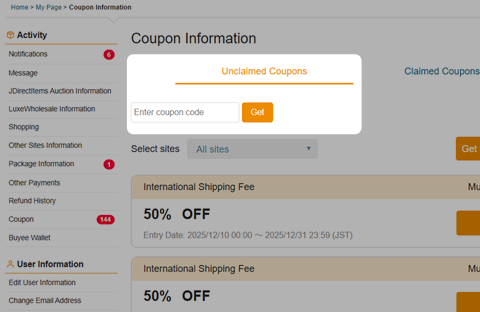
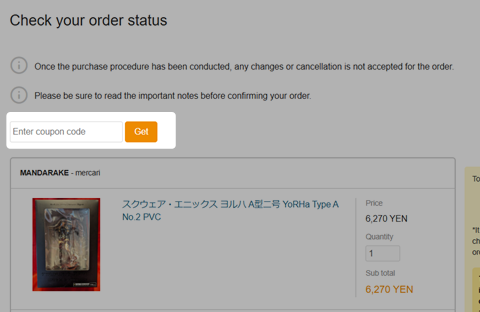
2. Enter your coupon code in the "Enter Coupon Code" field.

3. Click the [Get] button.

4. The "Coupon claimed" message will appear, and the process is complete.
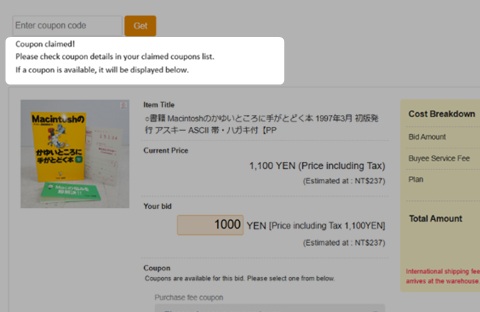
5. You can view your claimed coupons under [Coupon Information] > [Claimed Coupons].
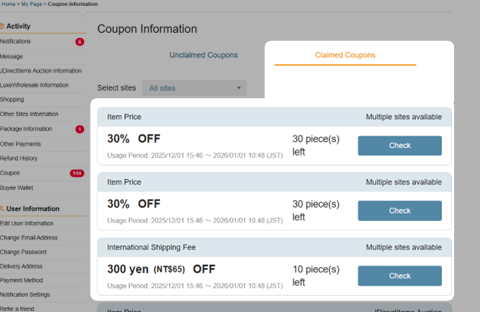
6. Select your coupon on each payment confirmation page to apply it.
Why you might see "Coupon not found.":
1. The coupon is outside the usage period.
2. You have already claimed the coupon.
3. You are not eligible for the coupon.
Please follow the steps below to claim it.
1. Go to the coupon collection page via [Coupon Information] > [Unclaimed Coupons].
* You can also claim coupons from the auction bidding page, the shopping order page, or the shipping checkout page.
2. Enter your coupon code in the "Enter Coupon Code" field.
3. Click the [Get] button.
4. The "Coupon claimed" message will appear, and the process is complete.
5. You can view your claimed coupons under [Coupon Information] > [Claimed Coupons].
6. Select your coupon on each payment confirmation page to apply it.
Why you might see "Coupon not found.":
1. The coupon is outside the usage period.
2. You have already claimed the coupon.
3. You are not eligible for the coupon.
Was this article helpful?
Thank you for your feedback. We'll use your feedback as reference.